25 Digital Product Side Hustle Ideas for Beginners
If you have been searching for side hustle ideas for beginners, you have probably come across the same suggestions again and again.
Become a virtual assistant.
Start freelancing.
Sell printables.
Start a blog.
Take surveys.
Deliver food.
Some of those are perfectly good ways to make extra money. But they are not the right fit for everyone.
I became much more interested in digital products because of how flexible they can be.
You do not necessarily need to sell your time by the hour. You do not need a warehouse full of stock. You do not need to start by creating a huge course either.
A digital product can be surprisingly small.
It could be:
- a calculator that helps someone make a decision;
- a spreadsheet that makes messy information easier to manage;
- a workbook that walks someone through a process;
- a set of templates that saves someone time;
- a planner designed around one very specific situation;
- a database that puts useful information in one place;
- a quiz or decision tool;
- a small toolkit that makes a frustrating task easier.
And this is one of the things I have been exploring myself while building Build with Lizzie.
When I started creating my own database of digital product ideas, I realised just how limiting the usual advice can be. If you only think of digital products as ebooks, courses and generic planners, you miss hundreds of potentially useful ideas.
So instead of giving you another list of vague suggestions like "make a planner", I want to show you 25 more specific digital product side hustle ideas, why somebody might want them, and what the actual product could look like.
First, what actually makes a good digital product idea?
This is the bit I would pay attention to before you start designing anything.
A product format is not the same thing as a product idea.
"Spreadsheet" is a format.
"Planner" is a format.
"Template" is a format.
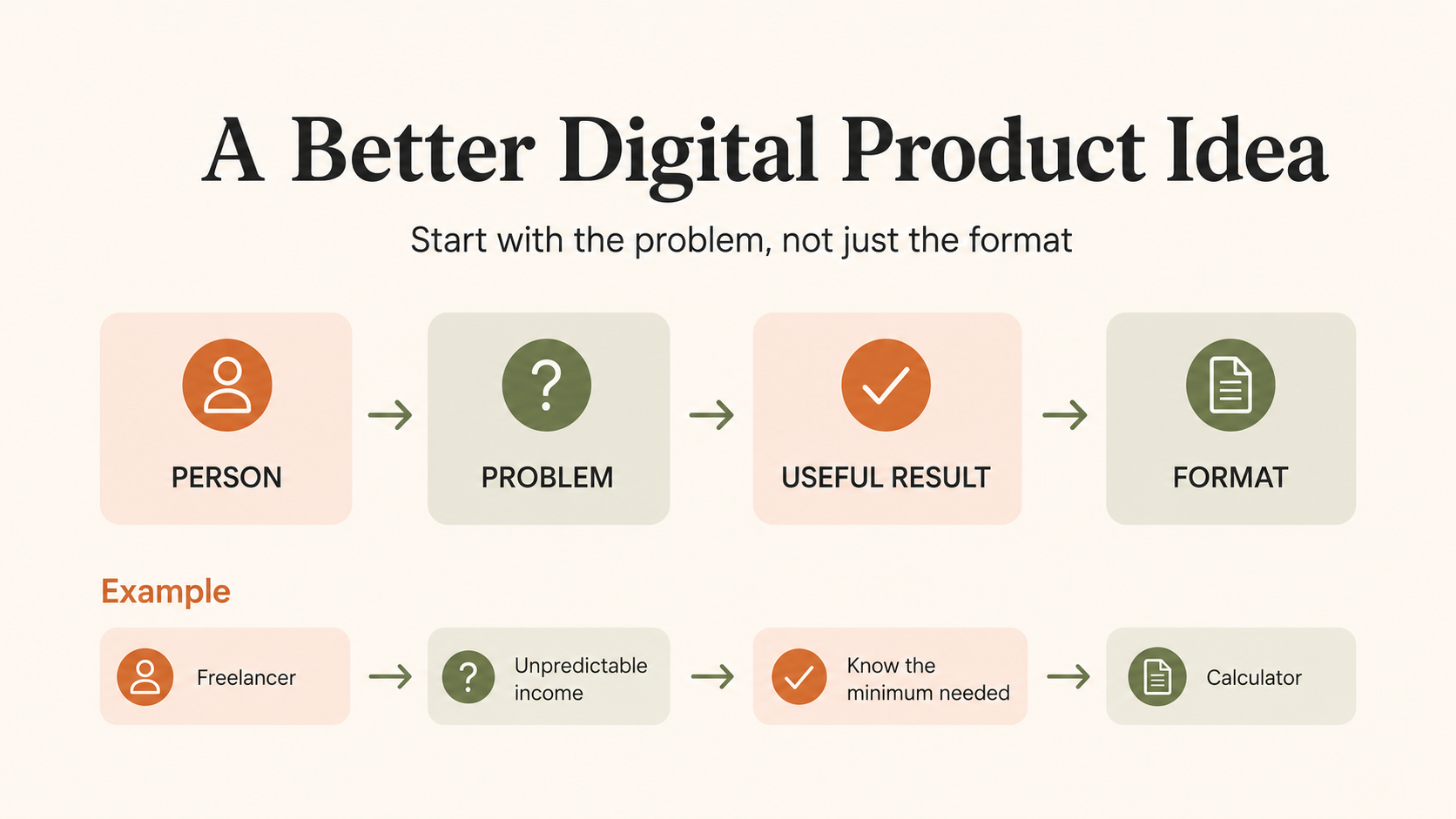
The stronger idea usually comes from putting four things together:
Person + Problem + Useful Result + Format
So:
Freelancer
- income changes every month
- needs to know the minimum amount they must earn
- calculator
becomes something like:
Bare-Minimum Month Calculator for Freelancers
That is immediately easier to understand than "budget spreadsheet".
The buyer is clearer. The problem is clearer. The result is clearer.
And importantly, you now have clues about what should actually go inside the product.
This is something I am trying to be quite strict about in my own product creation.
It is very tempting to think:
Ooh, I could make a pretty spreadsheet for that.
I have definitely done that.
But now I try to ask:
Who would actually open this, and what would they be hoping it helps them do?
That one question makes the ideas much stronger.
With that in mind, here are 25 possibilities.
Digital Product Type 1: Workbooks and Guided Planners
Workbooks work particularly well when someone knows they need to do something but needs help thinking it through.
The value is not really in giving them blank pages.
It is in giving them the right questions in the right order.
1. Career Change Evidence Workbook
Who it is for: Someone trying to move into a different career.
The problem: They know they have useful experience but struggle to explain how it transfers.
What the product could do: Help them collect work examples, identify transferable skills and turn their experience into evidence they can use in applications and interviews.
What you could include:
- previous-role inventory;
- transferable skills prompts;
- achievement bank;
- example evidence prompts;
- role comparison pages;
- application preparation section.
How AI could help you create it: Generate reflection questions, suggest skill categories and help turn rough examples into clearer prompts.
This is a good example of taking something broad like a "career workbook" and giving it a very clear job.
2. Study Week Planner for Busy Adults
Who it is for: Adults studying alongside work, family or other responsibilities.
The problem: Most study planners assume people have hours of uninterrupted time every day.
Useful result: Work out what genuinely needs doing this week and fit it around real life.
The planner could include:
- available-time planning;
- priority tasks;
- short study blocks;
- catch-up space;
- low-energy study tasks;
- weekly review.
You could make this even more specific for university students, apprentices, professional qualifications or parents returning to education.
3. 90-Day Experiment Planner
Who it is for: People who repeatedly set huge goals and then lose momentum.
Instead of asking them to transform their entire life, the product helps them choose one thing to test for 90 days.
They decide:
- what they are trying;
- why they are trying it;
- what they will measure;
- what might get in the way;
- when they will review it;
- what they learned.
I like this kind of product because it does not promise some magical transformation. It simply gives someone a structure for trying something properly.
4. Family Story Interview Workbook
Who it is for: People who want to capture the memories of parents, grandparents or older relatives.
Instead of a blank family tree, this could guide conversations around:
- childhood homes;
- school;
- first jobs;
- friendships;
- family traditions;
- relationships;
- major life events;
- funny stories;
- everyday life.
You could create versions for grandparents, parents, couples or even family reunions.
That is another useful lesson. One basic mechanism can often become several much more specific products.
5. Sensory-Friendly Travel Planner
Who it is for: Autistic, neurodivergent or sensory-sensitive travellers.
The problem: A normal itinerary does not capture some of the things that might actually determine whether the trip feels manageable.
The workbook might help someone research:
- travel times;
- noise;
- queues;
- busy periods;
- food options;
- escape spaces;
- downtime;
- backup plans;
- transport changes.
That creates a very different product from another generic holiday planner.
Digital Product Type 2: Trackers and Spreadsheets
A tracker is useful when the buyer needs to see patterns, remember information or keep several moving parts in one place.
I have a soft spot for this category because spreadsheets can look incredibly boring until you match them with the right problem.
Then suddenly they make perfect sense.
6. Exam Mistake Tracker
Who it is for: Students preparing for an exam.
Problem: They complete practice questions but keep making the same mistakes.
The spreadsheet could record:
- question/topic;
- type of mistake;
- why it happened;
- correct method;
- confidence level;
- date to revisit it.
Over time, the student can see where their biggest weaknesses actually are.
That is much more actionable than a general revision planner.
7. Rescue Pet Settling-In Tracker
Who it is for: Someone bringing a rescue pet into their home.
They could record:
- eating;
- sleeping;
- routines;
- behaviour;
- triggers;
- progress;
- questions;
- observations to discuss with appropriate professionals.
You could narrow this further into separate versions for rescue dogs, cats or specific settling-in periods.
8. Indoor Cat Enrichment Tracker
Problem: Someone buys toys and enrichment activities but has no idea what their cat actually enjoys.
The tracker could help them rotate activities and record responses.
Possible sections:
- activity;
- type of enrichment;
- duration;
- interest level;
- repeat or retire;
- notes.
It is simple, but that is fine.
A useful digital product does not need 37 tabs.
9. Freezer Inventory and Meal Matcher
I love products that solve very ordinary annoyances.
This one is for households that batch cook, freeze leftovers and then completely forget what is in there.
The spreadsheet might track:
- meal;
- portions;
- date frozen;
- use-by target;
- dietary notes;
- freezer location;
- meal-plan selection.
A more advanced version could suggest this week's meals from what is already available.
10. Craft Fair Stock Planner
Who it is for: Makers preparing for craft fairs, markets or pop-ups.
The product could help them plan:
- products;
- stock quantity;
- cost per item;
- selling price;
- expected revenue;
- actual sales;
- leftover stock;
- best sellers.
You now have something that is useful both before and after an event.
And you could rework the same basic product for candle makers, jewellery businesses, bakers, artists or crochet sellers.
Digital Product Type 3: Calculators and Decision Tools
This might be one of my favourite digital product categories.
Why?
Because a calculator answers a question.
That makes the value much easier to explain.
Someone enters information and gets an answer that helps them make a decision.
11. Bare-Minimum Month Calculator
Who it is for: Freelancers, self-employed people or anyone with variable income.
The question it answers:
What is the minimum amount I need to bring in this month?
Inputs might include:
- essential bills;
- debt payments;
- food;
- transport;
- business costs;
- minimum savings;
- existing income.
The result could show their minimum required income figure.
Much clearer than "monthly budget template".
12. Custom Cake Quote Calculator
Who it is for: Home bakers and small cake businesses.
A cake can look profitable until you remember the box, decorations, ingredients, electricity, delivery and six hours of your time.
A quote calculator could combine:
- ingredient cost;
- decoration cost;
- packaging;
- labour;
- delivery;
- overhead allowance;
- profit margin.
AI could help you brainstorm the categories and user instructions, while the actual formulas would still need testing carefully.
13. Market Day Profit Calculator
This could help a maker answer:
Was that market actually worth doing?
The user enters things like:
- stall fee;
- travel;
- parking;
- card fees;
- packaging;
- product costs;
- sales.
Then the calculator shows the actual result.
You could even add a simple comparison so someone can see which events were most profitable over time.
14. First-Car True Cost Calculator
Who it is for: Someone buying their first car.
It is easy to compare two cars by purchase price and completely miss everything else.
A comparison tool could include user-researched figures for:
- purchase price;
- insurance;
- tax;
- expected fuel use;
- servicing;
- parking;
- maintenance allowance.
The goal is not to tell the buyer which car they should buy.
It is simply to help them compare options using the same categories.
15. Wedding Budget Cap Calculator
This is a product direction I have actually explored in much more detail while experimenting with how generic products can be made more specific.
Instead of:
Wedding Budget Spreadsheet
you could make:
The £10K Wedding Planner
Now the product has a hard constraint.
The useful questions become:
- How much headroom is left?
- What happens if guest numbers increase?
- Which categories are pushing us over budget?
- What if supplier quotes rise?
- Can we add this without breaking the £10K cap?
That is much more interesting than simply changing the colours of a generic wedding budget tracker.
It is also a good example of why I think the angle matters as much as the format.
Digital Product Type 4: Templates and Done-For-You Kits
Templates are useful when people know what they need to do but do not want to start from scratch.
The more specific the situation, the easier they are to market.
16. Photography Client Preparation Email Kit
Who it is for: Family or portrait photographers.
Instead of writing the same emails for every booking, they could customise templates for:
- booking confirmation;
- what to wear;
- what to bring;
- preparing young children;
- weather changes;
- location reminders;
- day-before reminders;
- after-session follow-up.
You could create different versions for newborn photographers, wedding photographers, pet photographers or mini-session photographers.
17. First-Time Manager 1:1 Meeting Kit
Who it is for: Someone who has recently become a manager.
The kit could contain:
- meeting agenda;
- question bank;
- notes template;
- action tracker;
- difficult-conversation preparation sheet;
- follow-up template.
Again, it is not really the template that makes this interesting.
It is the situation.
"1:1 meeting template" is broad.
"Your first six 1:1 meetings as a new manager" is much easier to picture.
18. Airbnb Guest Message Template Pack
A host may send similar messages repeatedly.
A template kit could cover:
- booking confirmation;
- arrival instructions;
- parking;
- check-in;
- house rules;
- local recommendations;
- checkout;
- review request.
You could also create versions for holiday cottages, pet-friendly accommodation or longer stays.
19. Children's Party Planning Kit
This could combine several simple templates:
- guest list;
- invitation wording;
- food planning;
- activity schedule;
- shopping list;
- budget;
- party-day timeline.
Then niche it.
A generic birthday party kit could become:
At-Home Toddler Birthday Kit
or:
DIY Children's Garden Party Planner
The more recognisable the situation, the easier it becomes to decide what should be included.
20. New Puppy First-Week Kit
This could include:
- first-week routine;
- feeding tracker;
- toilet notes;
- supplies checklist;
- question sheet;
- household responsibilities;
- training notes.
You would need to be careful not to present professional veterinary or behavioural claims as your own expertise unless appropriately sourced.
But as an organisation and preparation tool, there is a clear job for the product.
Digital Product Type 5: Quizzes, Audits and Interactive Tools
Digital products do not have to look like traditional documents at all.
Sometimes the useful part is helping someone diagnose a problem, choose between options or work out their next step.
21. Hobby Match Quiz
Who it is for: Adults who want a hobby but genuinely do not know where to start.
The questions could look at:
- budget;
- available space;
- whether they want to leave the house;
- social vs solo;
- creative vs practical;
- physical effort;
- time available.
The result could suggest three hobby categories to investigate.
That could also make a great free lead magnet rather than a paid product.
And that is worth remembering too. Not every good digital product idea has to be sold.
Some are better at attracting exactly the right people into an email list.
22. ADHD Task Friction Audit
Instead of another enormous productivity planner, the entire product revolves around:
Why am I avoiding this particular task?
Someone could work through:
- Is the first step unclear?
- Does it feel too big?
- Is something missing?
- Is there too much choice?
- Is the environment making it harder?
- What could make starting easier?
The output might simply be one change to test.
Small product. Specific problem. Useful next step.
23. Household Waste Audit
Before someone buys a load of new zero-waste products, this tool could help them see what they are actually throwing away.
Categories might include:
- food;
- packaging;
- bathroom;
- cleaning;
- clothes;
- disposable items.
Then they choose one area to work on.
This could work as a printable workbook, spreadsheet, interactive audit or email challenge.
Same problem. Several possible formats.
24. Boundary Conversation Builder
This could be a prompt-assisted tool that helps someone organise their thoughts before a difficult conversation.
Rather than asking AI:
Write me a boundary.
the user works through:
- What happened?
- What do I need?
- What am I asking for?
- What am I not willing to do?
- How direct do I want to be?
- What needs to happen next?
Then AI could help them explore possible wording based on what they have already clarified.
I think that distinction matters.
AI should support the thinking, not replace it.
25. Baby Essentials Decision Tool
First-time parents can be presented with enormous lists of things they are supposedly going to need.
A tool could instead help someone think through:
- living space;
- feeding plans;
- transport;
- washing facilities;
- budget;
- what they can borrow;
- what can wait;
- what they already own.
The end result could be three categories:
Need before baby arrives
Probably useful
Can wait and see
That is much more useful than simply creating another 100-item baby checklist.
Notice how different these products are
That is really the point of this list.
Digital products can be:
Workbooks that guide someone through something.
Trackers that help someone notice patterns.
Spreadsheets that organise information.
Calculators that answer questions.
Templates that save time.
Kits that give someone everything they need for one particular task.
Audits that help someone understand a problem.
Quizzes that help someone choose.
Decision tools that make options easier to compare.
AI-assisted tools that help someone think or create.
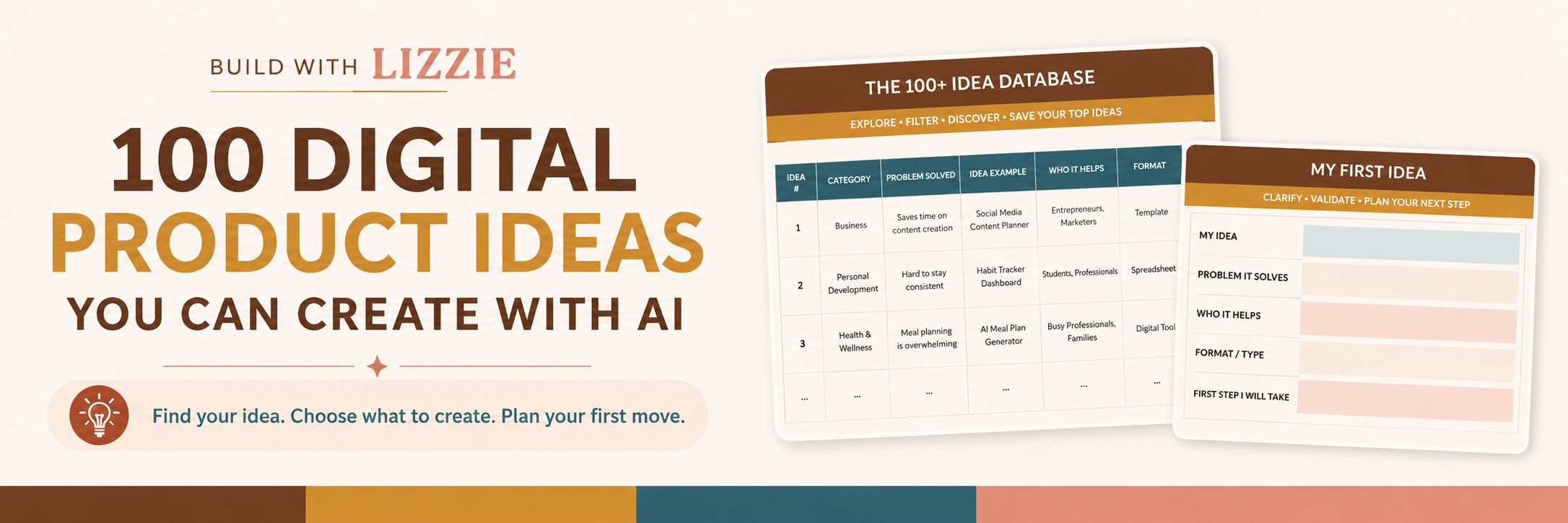
This was one of the reasons I ended up creating my 100 Digital Product Ideas You Can Create With AI workbook.
Once I started deliberately looking beyond "ebook, course, printable", the ideas multiplied very quickly.
One niche could produce ten different products depending on the problem you choose.
And one product mechanism could be adapted into completely different niches.
That is when digital product creation started to feel much more interesting to me.