How to Create a Freebie People Actually Want to Download
You can spend hours creating a beautiful freebie, adding pages, designing worksheets and making everything look polished… and still end up with something people don't really want to download.
One thing I'm learning as I build my own freebies and email list is that more content does not automatically make a better freebie.
People aren't usually looking for another PDF to save somewhere and forget about. They're looking for something that helps them:
- solve a problem;
- make a decision;
- come up with an idea;
- save time;
- organise something;
- or finally get started.
So before I open Canva or start asking ChatGPT to write pages of content, I now try to answer one question:
What would make the right person see this and immediately think, “I need that”?
In this post, I'll show you a simple way to create a freebie people actually want, including the tools and AI prompts you can use along the way.
1. Start With a Problem, Not a Format
It's really tempting to begin with:
“Should I create a workbook?”
“Maybe I should make a checklist?”
“Would an ebook look more valuable?”
But the format shouldn't come first.
Start with the person.
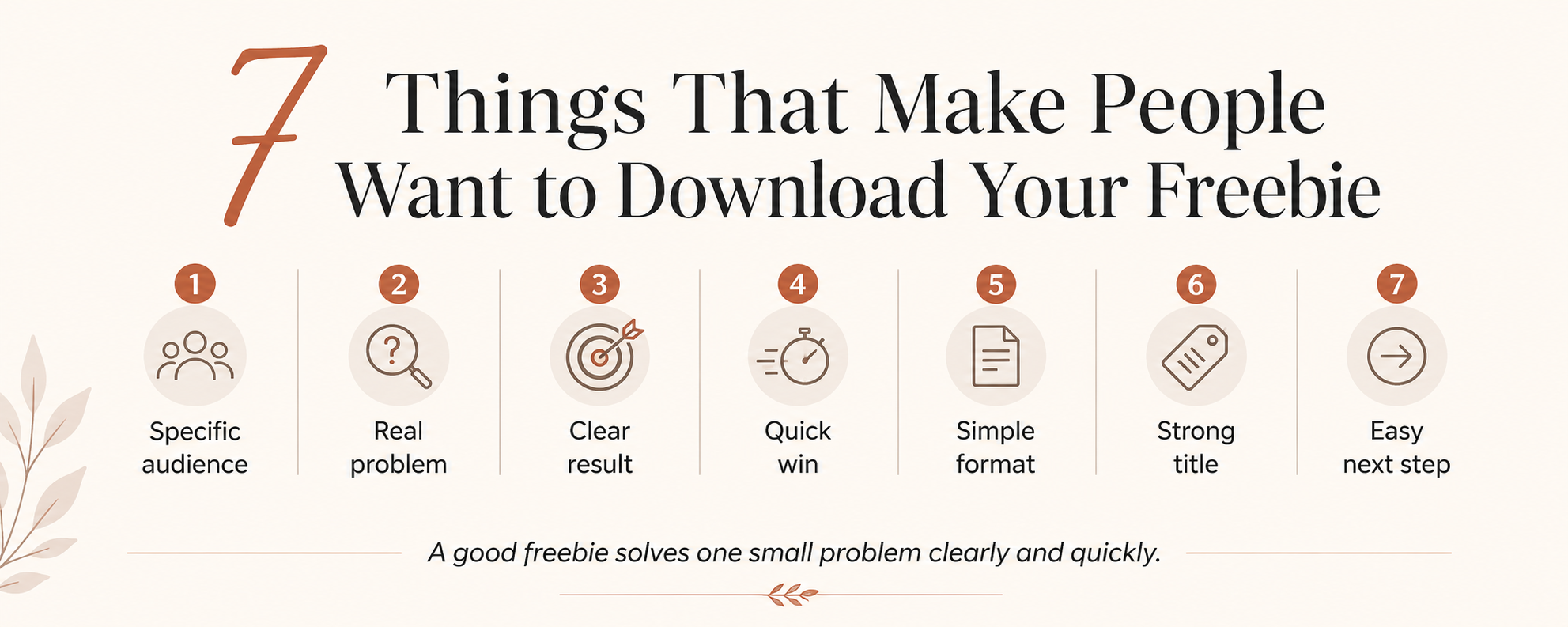
What are they trying to do? What are they stuck on? What small problem could you help them solve?
For example, instead of starting with “I want to make a gardening ebook,” start with:
“A beginner wants to grow vegetables but has no idea what to plant first.”
Instead of:
“I want to create a wedding planner,”
you might start with:
“A couple doesn't know whether their wedding plans actually fit their budget.”
And instead of:
“I want to make a business workbook,”
you could start with:
“Someone wants to grow an email list but has no idea what freebie to create.”
That last one is exactly the problem I created my own Create Your First Freebie With AI Workbook around.
Tool: ChatGPT
Try this prompt:
I create content for [AUDIENCE]. Give me 20 small but frustrating problems this person experiences relating to [TOPIC]. Focus on problems they would actively want solved quickly rather than broad long-term goals.
Tip
Look for small, specific problems.
Your freebie doesn't need to transform someone's entire life.
Sometimes the best result is simply:
“I didn't know what to do next. Now I do.”
2. Make the Result Really Obvious
A freebie becomes much easier to want when the outcome is clear.
Compare:
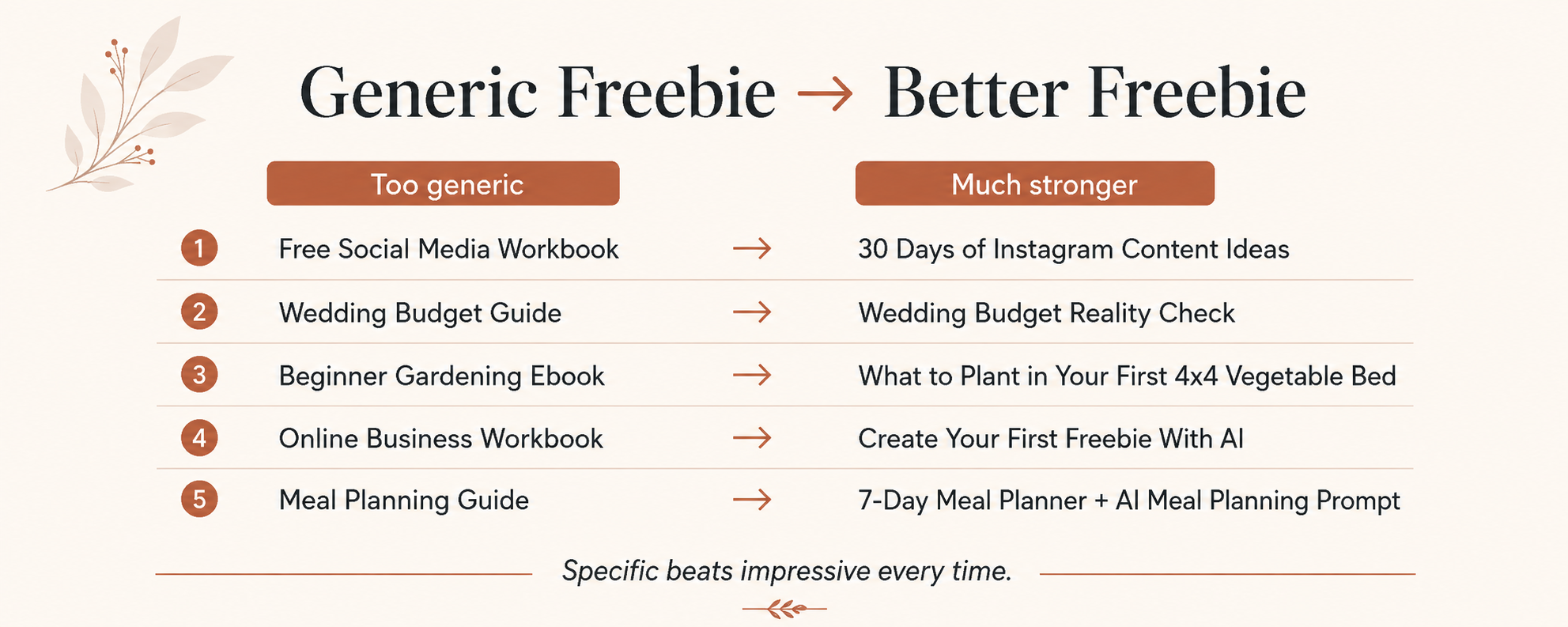
Free Social Media Workbook
with:
30 Days of Instagram Content Ideas
Or:
Wedding Budget Guide
with:
Wedding Budget Reality Check
The second version gives me a much clearer reason to download it.
I know what I'll get and, more importantly, what it will help me do.
A simple formula I like is:
Specific person + specific problem + useful result
You don't have to cram all three into the title, but they should be clear somewhere in the offer.
This is also why I wouldn't spend too long trying to come up with clever names.
Clear normally beats clever.
3. Give Them a Quick Win
One of the best questions you can ask is:
Could somebody get something useful from this freebie within about 10–15 minutes?
A quick win might mean they:
- choose an idea;
- calculate a number;
- create a simple plan;
- identify a problem;
- complete a checklist;
- generate some content;
- organise information;
- or decide what to do next.
For example, instead of making an enormous 50-page guide to meal planning, you could create:
7-Day Meal Planner + AI Meal Planning Prompt
Someone can open it and actually do something.
I'm trying to think about my own freebies in the same way.
Not:
“How much can I give away?”
But:
“How quickly can I make this genuinely useful?”
That's a much better question.
4. Choose the Format After You Know the Result
Once you know the problem and the quick win, deciding what to create becomes much easier.
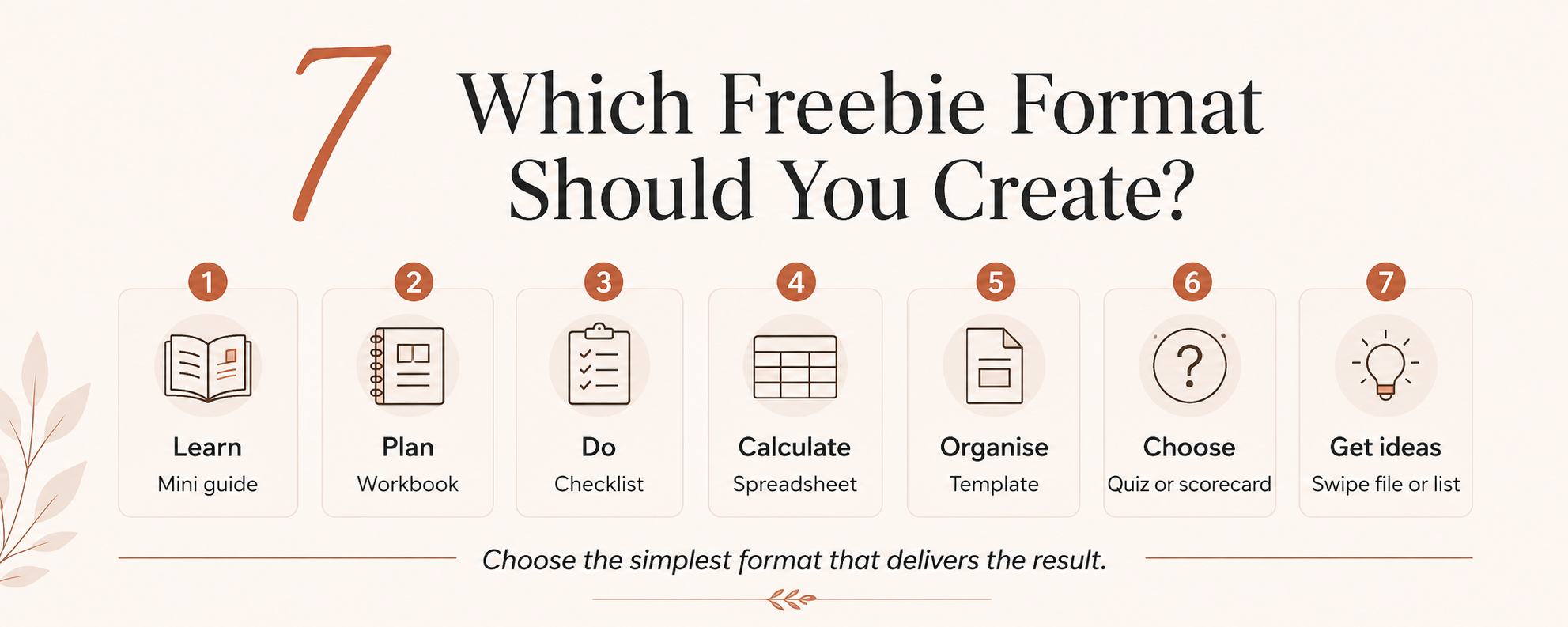
If someone needs to learn something, a short guide might work.
If they need to make a plan, use a workbook.
If they need to follow a process, create a checklist.
If they need to calculate something, use a spreadsheet.
If they need to organise information, make a template.
If they need to choose between options, create a quiz or scorecard.
If they need ideas or inspiration, a swipe file or list might be perfect.
Useful tools
You really don't need a huge tech stack.
ChatGPT — brainstorming, structure, prompts, drafts, examples and feedback.
Canva — PDFs, worksheets, checklists and visual resources.
Google Docs — simple guides that don't need complicated design.
Google Sheets or Excel — trackers, calculators, planners and databases.
MailerLite — landing page, signup form, delivery email and welcome sequence.
Tip
Use the simplest tool that delivers the result.
A one-page checklist that solves the problem is better than an interactive 20-tab spreadsheet nobody wants to use.
5. Use AI to Help You Build It — Not Think for You
AI can make the process much faster, especially when you're staring at a blank page.
I use ChatGPT to help with things like:
- brainstorming freebie ideas;
- narrowing the audience;
- finding better angles;
- creating the structure;
- generating examples;
- drafting questions;
- developing checklists;
- improving titles;
- and reviewing the finished idea.
But I still need to decide whether the idea is actually useful.
Here's a prompt you can copy:
I want to create a free resource for [AUDIENCE] who struggles with [PROBLEM]. The freebie should help them achieve [SMALL RESULT] in around 10–15 minutes. Suggest 10 freebie concepts. For each, give me the format, what would be inside it, the quick win, a clear title and why someone would want to download it. Avoid broad ebooks and generic advice.
This is especially useful if you know your audience but don't yet know what your freebie should be.
Want Help Creating Yours?
If you're currently thinking:
“Okay, I understand what makes a good freebie… but I still don't know what mine should actually be.”
That's exactly why I made my Create Your First Freebie With AI Workbook.
It helps you choose your audience, identify the problem, develop your freebie idea and use AI to help you actually create it — without starting from a completely blank page.
6. Make It Specific Enough to Feel Valuable
One of my favourite rules for freebies is:
Specific beats impressive.
Compare:
The Ultimate Productivity Guide
with:
Sunday Reset Checklist for a Less Chaotic Week
Or:
Beginner Gardening Ebook
with:
What to Plant in Your First 4x4 Vegetable Bed
Or:
Online Business Workbook
with:
Create Your First Freebie With AI
The more specific option immediately gives the right person a reason to pay attention.
Being specific doesn't mean you need an incredibly tiny niche.
It just means someone should be able to recognise:
“This is for a problem I have.”
7. Check That People Actually Care About the Problem
Before spending three days polishing your freebie, look for some evidence that people actually care about the topic.
You can check:
- Pinterest searches;
- Google autocomplete;
- Reddit discussions;
- Facebook groups you're already part of;
- YouTube comments;
- product reviews;
- questions people regularly ask you.
You aren't trying to conduct a giant market research project.
You're simply looking for signs that people already search for, ask about or struggle with the problem.
Pinterest tip
Go into Pinterest and begin typing your topic into the search box.
Pay attention to the phrases Pinterest suggests.
Those can tell you a lot about how people naturally describe the problem.
They can also give you ideas for your freebie title, blog posts and Pins later.
8. Give Your Freebie a Title People Understand
You don't need to reinvent copywriting.
Some simple title formulas work really well:
Number + desired thing
For example:
50 High-Protein Lunch Ideas
Result + checklist
For example:
First Apartment Moving Checklist
Specific problem + planner
For example:
Irregular Income Budget Planner
How to + result
For example:
How to Create Your First Freebie With AI
Timeframe + result
For example:
30 Days of Pinterest Content Ideas
You can also ask ChatGPT:
Give me 20 names for this freebie: [DESCRIPTION]. Prioritise clarity and desirability over cleverness. Someone should understand what they'll get and why it is useful within two seconds.
9. Run the “Would I Download This?” Test
Before you publish, ask yourself five questions:
- Can I immediately tell who this is for?
- Does it solve a specific problem?
- Is there a clear result?
- Can somebody use it quickly?
- Would the title make the right person want to know more?
If you're answering “kind of…” to several of those questions, I'd tighten the idea before spending more time making it prettier.
Because ultimately, people aren't downloading your colour palette.
They're downloading the result.
You Don't Need to Make the Perfect Freebie
This is something I'm reminding myself of while building my own.
Your first freebie doesn't need to be revolutionary.
It doesn't need 50 pages.
And you definitely don't need to spend weeks perfecting it before anybody sees it.
It needs to make the right person think:
“That's exactly what I need right now.”
Start there.
Make something genuinely useful.
Put it in front of real people.
Then pay attention to what happens and improve from there.
And if the blank-page stage is the bit stopping you, you can grab my Create Your First Freebie With AI Workbook below.